Get Started in 2 Minutes
Ready to automate your outreach? Follow this quick guide to install and set up Just My Type — completely free, no account required.
Install the Extension
Add Just My Type to your browser in seconds. It's free, lightweight, and works instantly — no signup needed.
Add to Chrome
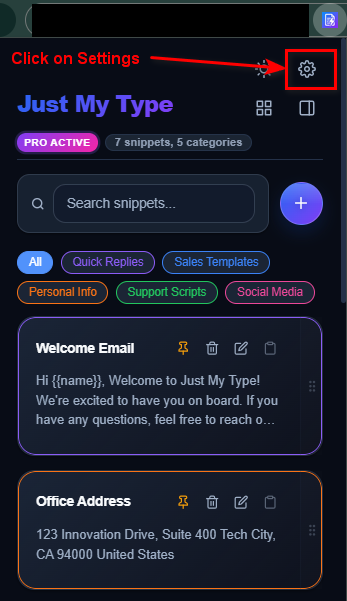
Open Extension Settings
Click the extension icon in your toolbar, then tap the settings gear icon to configure your preferences.
Create Your First Snippet
In settings, navigate to your snippet library. Create shortcuts for your most-used phrases, email templates, or outreach scripts. All data stays 100% local in your browser.
Create Snippets
Type Your Shortcut
Start Typing Faster
Navigate to any text field on any website. Type your snippet shortcut and watch it expand instantly. No server calls, no delays — everything runs locally on your machine.
You're All Set!
Just My Type is 100% free with no account required. Your data stays private, stored only in your browser's local storage. Enjoy faster, smarter outreach!
Add to Chrome